Prototype · engineering education
Instructor for SOLIDWORKS
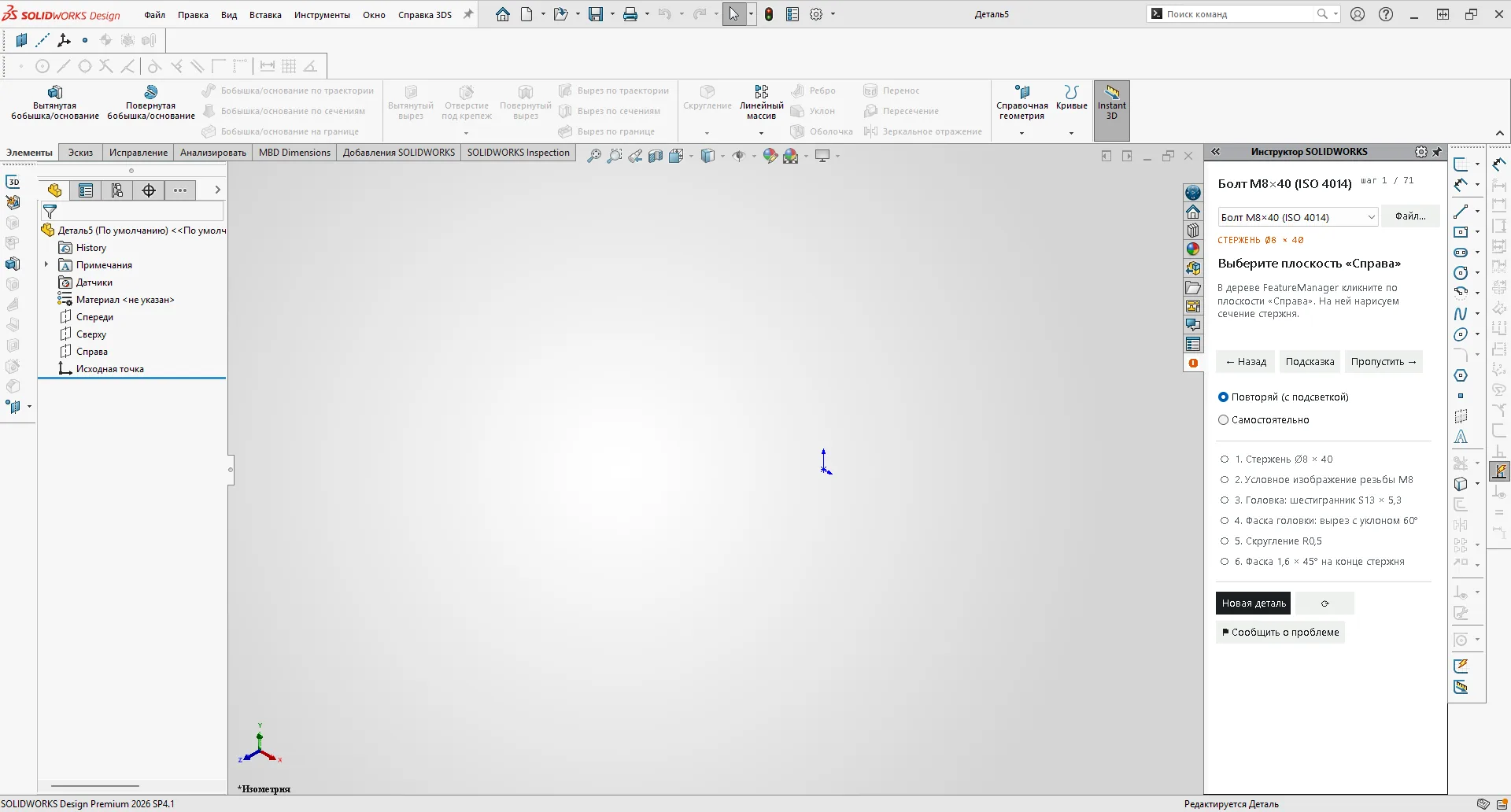
Learn 3D modelling where the work happens. The instructor shows where to click, watches the model and confirms each step only when the geometry is right.
Why an instructor inside the CAD system
A video course shows how someone else builds a part. A beginner then switches windows, loses the place and cannot tell whether the result matches. The instructor removes that gap: the lesson lives next to the model, points at the real button or field and checks the actual feature tree, not a screenshot.
If something is off, it says what exactly: “depth is 35 mm, the lesson needs 40 — edit the feature”. Steps that are already done in the model are credited automatically, so the learner is never forced to repeat the path click by click.
How it works
| Part | What it does |
|---|---|
| Instructor add-in | C#/.NET add-in in the SOLIDWORKS task pane: step panel, highlighting of ribbon buttons, menu items and PropertyManager fields, “Guided” and “On your own” modes, a “Report a problem” button that saves a screenshot and the step journal locally. |
| Model checks | Through the SOLIDWORKS API: sketch plane and entities, “fully defined” status, open panel and its values, feature type and parameters (depth, end condition, draft, radius, thread size), assemblies (components, mates) and drawings (views, annotations). |
| Lesson generator | Reads a finished .SLDPRT — sketches, dimensions, features — and replays the build in SOLIDWORKS, capturing what the learner sees before every action. Every number in the steps comes from the model, not typed by hand. |
| Robot learner | Passes lessons through the API and UI Automation and reports steps that were done but not credited — regressions are caught before a person sees them. |
| Browser lesson | The same lesson file in a browser: frames of real SOLIDWORKS, clicks on the frame, value input and a 3D target for each block. No installation and no SOLIDWORKS licence needed. |
Current state
Honest status as of . Only one lesson has passed a full manual check; everything else is a verified draft.
| Item | Status |
|---|---|
| Lesson “Bolt M8×40 (ISO 4014)” | 71 steps in 6 blocks. Passed manually end to end in the add-in; published as a browser lesson. |
| Lesson 3. Bracket | A browser exercise based on a complete construction recording. The updated add-in lesson has API and regression checks; its full manual replay is pending. |
| Beginner curriculum (draft) | 175 lessons, 1312 steps, 532 with automatic checks: sketches, features, patterns, sweeps and lofts, assemblies, drawings. The robot ran every lesson: 342 steps credited, 734 explanation steps, 144 beyond the robot (mouse picks on faces), 1 failure. Manual review is in progress section by section. |
| Platform | SOLIDWORKS 2026 SP4.1 on Windows, Russian interface. Other versions and the English interface are not yet verified. |
| Availability | The browser lessons are open to everyone. The add-in has no public installer yet; pilot access on request. |
Development plan
Done · October 2026
Foundation
Lesson generator from a finished part, browser player, instructor add-in with model checks, robot learner and a local “Report a problem” loop.
Now
First public lesson
“Bolt M8×40”: passed manually in the add-in, re-captured in SOLIDWORKS 2026 SP4.1 and published here as a browser lesson. Feedback from first learners goes into the generator rules.
Next
A verified lesson series
Manual review of the beginner curriculum section by section — sketches, features, assemblies, drawings. Each fix is pinned by a robot check so the class of error does not return. Browser lessons are published on our own parts: fasteners, revolved and sheet parts.
Next
Add-in pilot
Signed installer, lesson catalogue inside the panel, saved progress, English SOLIDWORKS interface and earlier versions (2024–2025). Pilot with individual learners and one training group.
Later
Tools for teachers
Turn your own part into a lesson without programming, review a draft step by step, and get a completion report (time, errors, hints). A test mode without highlighting for assessment.
Exploring
Beyond one CAD system
The lesson format separates steps, checks and interface layout. Whether the approach transfers to other CAD systems with an open API will be decided after the pilot.
The plan sets order, not dates. A stage starts when the previous one passes its checks.
Data and boundaries
The add-in works on the learner’s computer and does not send anything over the network: the step journal and problem reports are saved locally. Course files open as copies, the originals are not modified. The browser lesson stores only the current step and mode in the browser.
SOLIDWORKS is not included: the add-in needs a licensed SOLIDWORKS installation. SOLIDWORKS is a registered trademark of Dassault Systèmes SolidWorks Corporation; Kolosei is an independent developer and is not affiliated with or endorsed by Dassault Systèmes.
Recent changes
- Bolt M8×40 lesson re-captured in SOLIDWORKS 2026 SP4.1 on a clean model and published as a browser lesson.
- C# add-in inside SOLIDWORKS; lesson generator and robot learner; 175 draft lessons for a beginner curriculum.
- First prototype: Bolt M8×40 lesson generated from a finished part, browser player and a live instructor.
Teach or learn SOLIDWORKS?
Start with the browser lesson. If you want the instructor inside your SOLIDWORKS — for yourself, a class or a training centre — write to us about a pilot.